Hi, I’m trying to get the SMPTE Master Clock feature in Splash working, but I’m stuck and would really appreciate some help.
Here’s what I’ve done so far:
I generated SMPTE LTC .wav file and imported into Ableton Live
After configuration, exported LTC signal, This LTC output works perfectly when tested with other software like TouchDesigner, Resolume, and TimeCode Monitor — they all receive and sync without any issues.
However, when I try to use the same LTC signal in Splash, it fails to start properly and stays paused.
it just stays paused, and the SMPTE clock in Splash never starts running.
So provide proper setup guide or signal routing instructions for using SMPTE Master Clock in Splash (Windows & Linux). What are the required input levels or audio format (bit depth / sample rate) for Splash to detect LTC properly?
Is there any known issue with PortAudio / VB-Cable when Splash tries to read LTC input? How can I confirm that Splash is actually reading the audio stream and not rejecting the LTC signal?
If anyone has successfully configured Splash to sync via SMPTE LTC, please share your setup details or screenshots of your routing. Thanks
Thanks for opening a thread regarding this issue. Indeed all the available documentation is about using SMPTE on Linux, and even though it is still valid it should be updated to match the current state of the audio stack, especially regarding Pipewire which made Jack less useful.
On Windows I never tested Splash with any audio server which allows for connecting applications together. I’ll take a look at it and install it on my computer.
With that said, Splash is indeed picky regarding the audio levels. I use libltc to decode the stream, from an 8bits/44.1kHz reading of the audio signal, as this is the default for this library. But it should work with some fiddling.
I have a few questions:
can you share a precise workflow that I could reproduce to test it on Windows, with some freely available tools preferably?
how did you generate the LTC file, and can you share a 1min sample so that I can test with it?
did you try with a physical audio input, just to check that it works in this case?
On my side I’ll first test it again with a file generated by libltc, using a physical input, and keep you posted.
PopOS 22.04, X11, Nvidia GPU with two projectors connected to two ports and 1 connected to monitor. There is no speaker connected to this system.
Jack installed simply by sudo apt install jackd mplayer
Since libltc / ltc-tools was not directly available to install , had to use homebrew to install libltc from ltc-tools — Homebrew Formulae .
Generated a wav file using ltcgen -t 00:00 -l 00:01:00:00 /tmp/timecode.wav
Imported the wav into an audacity timeline. Audacity audio set-up :
48,000 KHZ
16 bit PCM
Driver : Jack Audio Control Kit
Playback : Loopback device
Hit the play button with looped playback on
Launched splash, ltc main clock works out of the box. Do not have to provide any jack device name in the splash ltc/master clock parameter.
What does not work :
Different PopOS 22.04, X11, Nvidia GPU with two projectors connected to two ports and 1 connected to monitor. There is a speaker connected to this system.
Jackd installed through sudo apt install ubuntustudio-audio and subsequently
sudo apt update -y
sudo apt install jackd2 qjackctl pipewire-jack

sudo apt install jack-mixer
sudo apt install jack-keyboard
sudo apt install carla
sudo apt install zita-mu1

# Rename the original jack library:
sudo mv -v /usr/lib/x86_64-linux-gnu/libjack.so.0 /usr/lib/x86_64-linux-gnu/libjack.so.0.bak

# Link the pipewire library:
sudo ln -s /usr/lib/x86_64-linux-gnu/pipewire-0.3/jack/libjack.so /usr/lib/x86_64-linux-gnu/libjack.so.0
Using the same timecode.wav file generated in the earlier system
Launched splash first and then audacity so i could rescan all audio devices
Imported the wav into an audacity timeline. Audacity audio set-up :
48,000 KHZ
16 bit PCM
Driver : Jack Audio Control Kit
Hit rescan audio devices
Playback : (Chose this) Alsa plugin [splash]
Hit the play button with looped playback on
LTC main clock remains paused. Tried a combination of names in the splash ltc/master clock parameter. PortAudio works sometimes. observed these things using qjackctl/graph
I was under the impression that you were using Windows, due to the mention of VB-Cable, sorry for that.
The fact that it works in the first setup and not the second might be due to your second setup relying on jackd2, while the first one uses jackd. I remember having issues with the former, but it was a long time ago and I don’t remember that very well.
With that said, I see you replace the Jack library with the one from Pipewire. Is PopOS 22.04 using Pipewire? If so, you might not need to install Jack at all. As I said earlier, this documentation is quite old and I should update it to consider Pipewire.
I’ll try installing a PopOS 22.04 virtual machine and see if I can reproduce your issue.
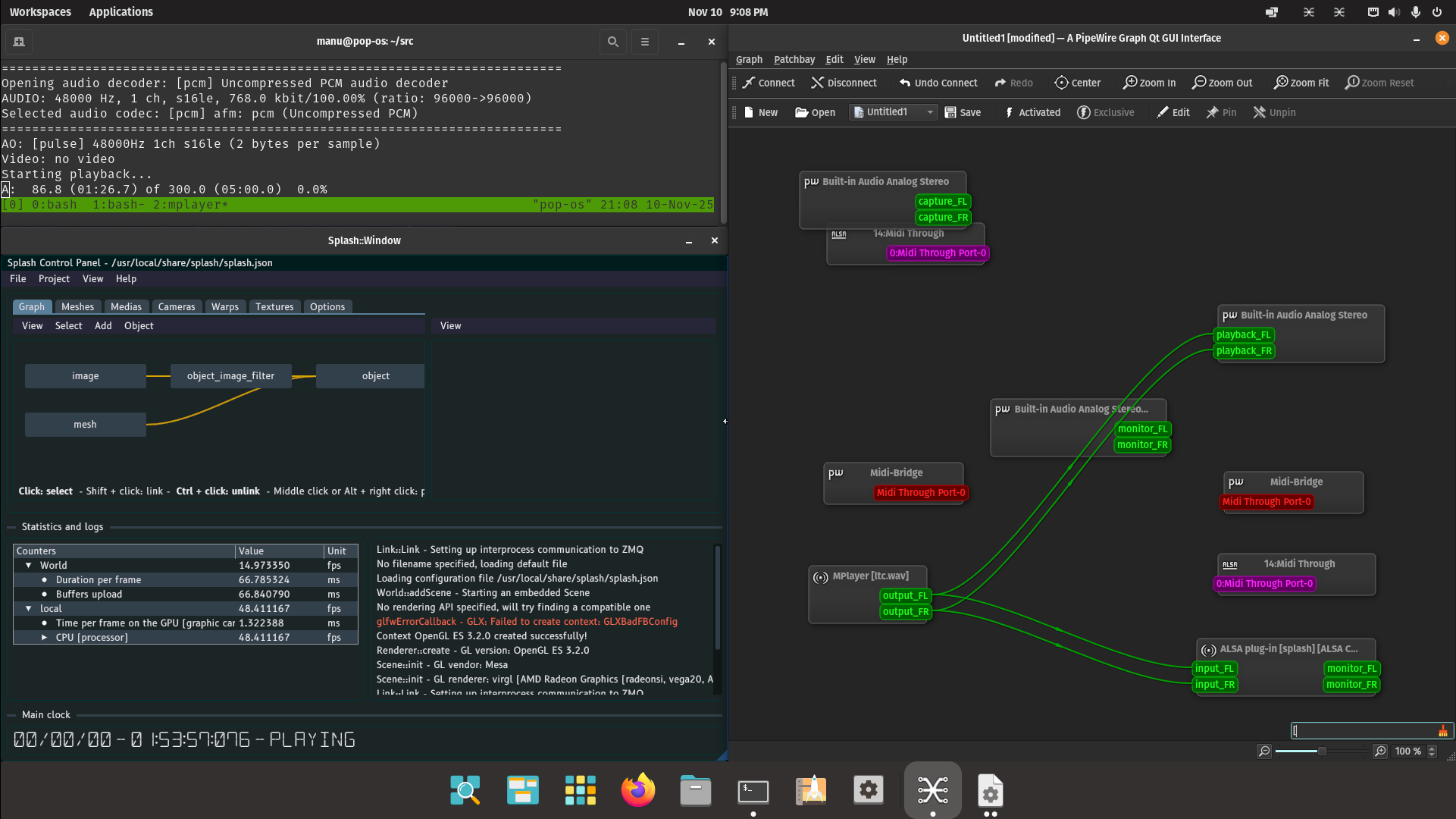
I just tested in a vanilla Pop_OS 22.04 install, in a virtual machine. I built Splash manually, as well as the ltc-tools (directly from there, after having install libltc-dev and libsndfile-dev) and qpwgraph from the Flatpak package (with flatpak install org.rncbc.qpwgraph).
After that I generated a wav file with ltcgen, read it with mplayer, ran splash and use qpwgraph to plug mplayer into Splash, which gave this:
For your information, I just refactored the documentation and updated the page related to SMPTE LTC. It should be more up-to-date now, please tell me if you see any issue: SMPTE master clock - Splash 0.11.14 documentation